 PDF-DRM.com
Securely Share PDF Documents with Specific Users
Last updated: June 13, 2026
In the last tutorial, we saw how we can protect PDF documents from unauthorized copying, printing, and downloading. In this tutorial we will look into how to securely share it with specific users.
Prerequisites
In order to take full advantage of the DRM features we are offering, you will need a:
- PDF-DRM.com account: Sign up for free or log in if you already have one.
- A PDF document uploaded to your account. If you haven't uploaded a document yet, refer to our previous tutorial for step-by-step instructions.
Restrict Access to Authorized Recipients
To share a PDF document with specific users, follow these steps:
- Log in to your account.
- Click on Manage My Documents on the left side of the navigation panel.
- Click on the Edit icon of the PDF you would like to share it with specific users.
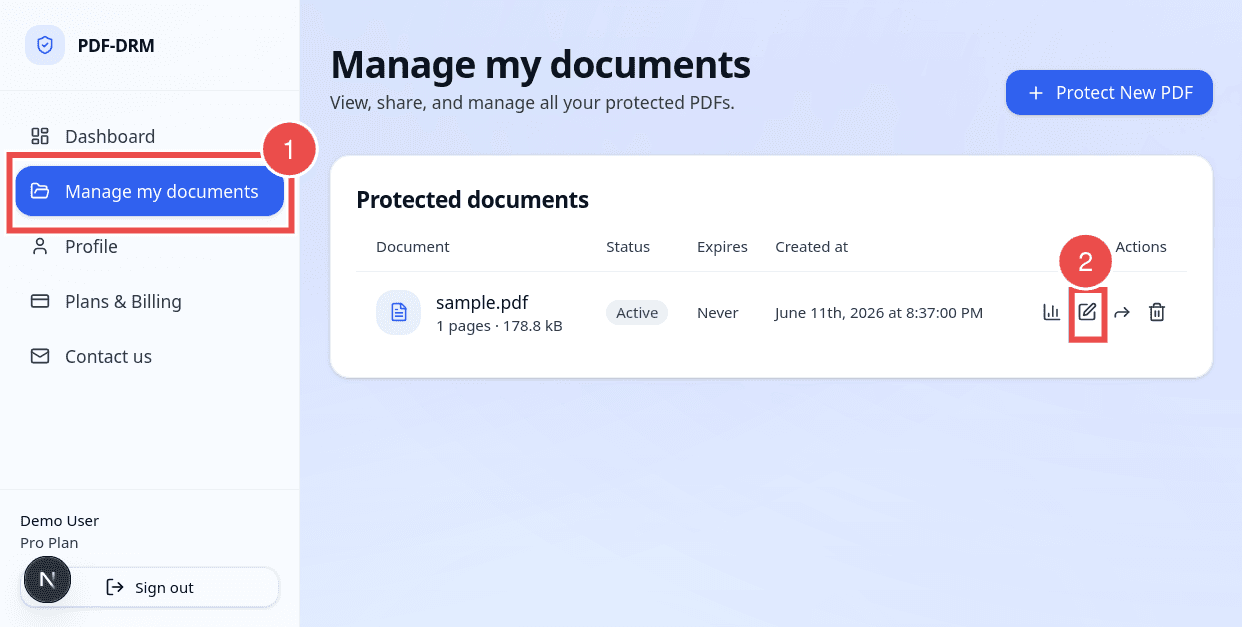
Next, you will be redirected to the document settings page.
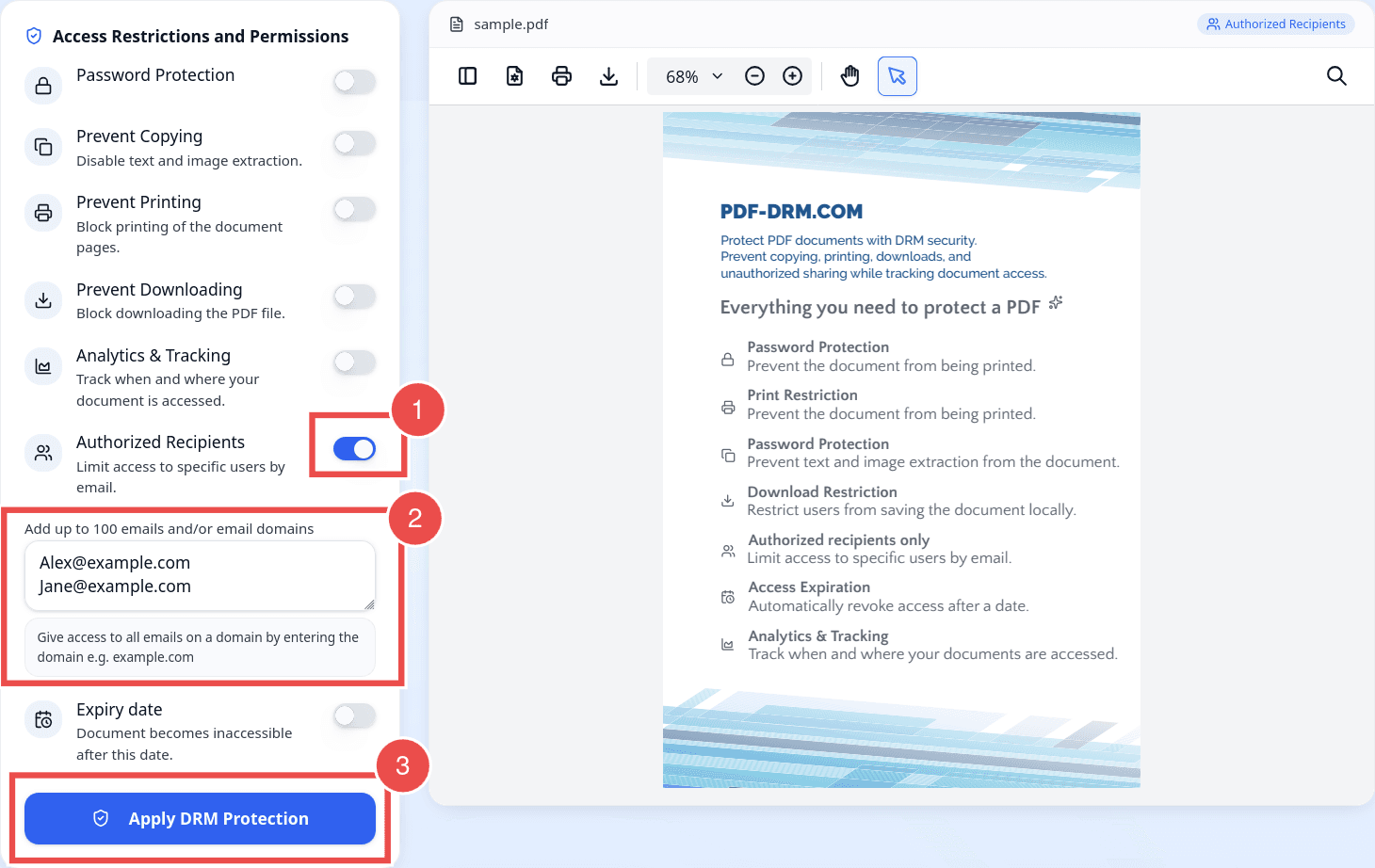
- Toggle the Authorized Recipients switch to enable sharing the document with specific users.
- In the text box provided, enter the email addresses of the users who should have access to the document. Enter one email address per line. Example:
- To allow access for all users within a specific organization, enter a domain name instead of individual email addresses. Example:
- example.com
Note: You can add up to 100 email addresses or domains per document. If you need a higher limit, please contact our support team.
Once you have finished configuring the authorized recipients, click on Apply DRM Protection button located at the bottom-left corner of the page.
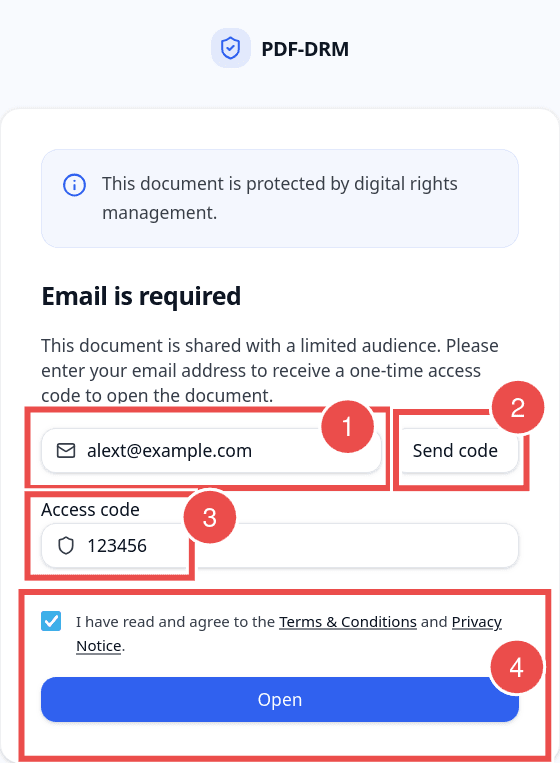
Your PDF is now protected with a secure shareable link. You can share this link with authorized users. When they open it, they will be prompted to enter their email address for verification. If the email address matches an authorized recipient, they will receive a one-time code in their inbox. This code is valid for 15 minutes, and users must enter it within this time window to access the document.
FAQs
Do my PDF recipients need to register to view the document?
No. Recipients do not need to register to access the document. They only need the shareable link that you provide.
If the PDF is protected with a password, recipients will also need the password to decrypt and open the document. Without the correct password, they will not be able to access the file.
Do recipients receive an invitation email automatically?
Recipients do not receive an automatic invitation email when a document is shared. Instead, they must be sent the shareable link manually by the document owner.
When a recipient opens the link, they will receive a one-time verification code in their email inbox. They must enter this code to verify their identity and access the document.
If the document is also password-protected, the password will be required in addition to the email verification code.
What if the user does not receive the one-time code?
If the user does not receive the one-time verification code, they can request a new code by clicking the Send Code button.
A new verification code will be generated and sent to their email inbox. The previous code will expire once a new one is issued, ensuring that only the most recent code can be used for authentication.
How long is the one-time verification code valid?
The one-time verification code is valid for 15 minutes. After this time period, the code will automatically expire and can no longer be used to access the document. Users will need to request a new code if the previous one has expired.
Can I revoke access for one or more recipients?
Yes. You can revoke access for specific recipients at any time. Simply go to the document's settings, locate the list of authorized users or domains, and remove the email address(es) you no longer want to have access. Once removed, those users will immediately lose access to the document and will no longer be able to open it using the share link or verification process.
Can the one-time verification code be used more than once?
No. The one-time verification code can only be used once. After it has been successfully entered, it becomes invalid and cannot be reused for future access attempts.
Conclusion
PDF-DRM.com enables you to securely share your PDF documents with specific users while maintaining full control over access. By combining authorized recipients, email verification, and optional password protection, you can ensure that only intended users are able to view your sensitive content. Access permissions can be updated at any time through your account dashboard, including the ability to revoke access for individual users or domains, giving you continuous control even after the document has been shared.