 PDF-DRM.com
Secure Browser-Based PDF Viewer with DRM Protection
Organizations regularly share confidential PDF documents with employees, customers, suppliers, contractors, and business partners. While sending a PDF by email or sharing it through cloud storage is simple, it also creates a significant security challenge: once recipients download the file, they often have unrestricted control over it.
PDF-DRM.com solves this problem by offering a secure browser-based PDF viewer allowing users to view protected PDF documents directly in their web browser without downloading the original file or installing additional software. By combining browser-based document viewing with Digital Rights Management (DRM), organizations can control who can access documents, what actions are permitted, and how long documents remain available.
This approach improves user experience while helping organizations protect confidential information such as contracts, engineering drawings, financial reports, legal documents, training materials, and intellectual property.
The limitations of traditional PDF sharing
Standard PDF files are designed for portability, not security. Once a PDF is downloaded, recipients can often:
- Copy text and images
- Print unlimited copies
- Forward the file to unauthorized users
- Store the document indefinitely
- Upload it to public file-sharing services
Even password-protected PDFs have limitations. After entering the password, recipients typically gain unrestricted access to the document, making it difficult to control how the content is used or distributed.
For organizations handling confidential information, these limitations create unnecessary security risks.
What is a browser-based PDF viewer with DRM protection?
A browser-based PDF viewer with DRM protects documents by delivering them through a secure online viewer instead of sending unrestricted PDF files directly to recipients.
Rather than downloading the original PDF, authorized users receive a secure link that opens the document in their web browser. Before access is granted, the DRM system verifies the user's identity and checks that they have permission to view the document.
Because access is controlled on the server side, document owners can continue managing permissions even after the document has been shared.
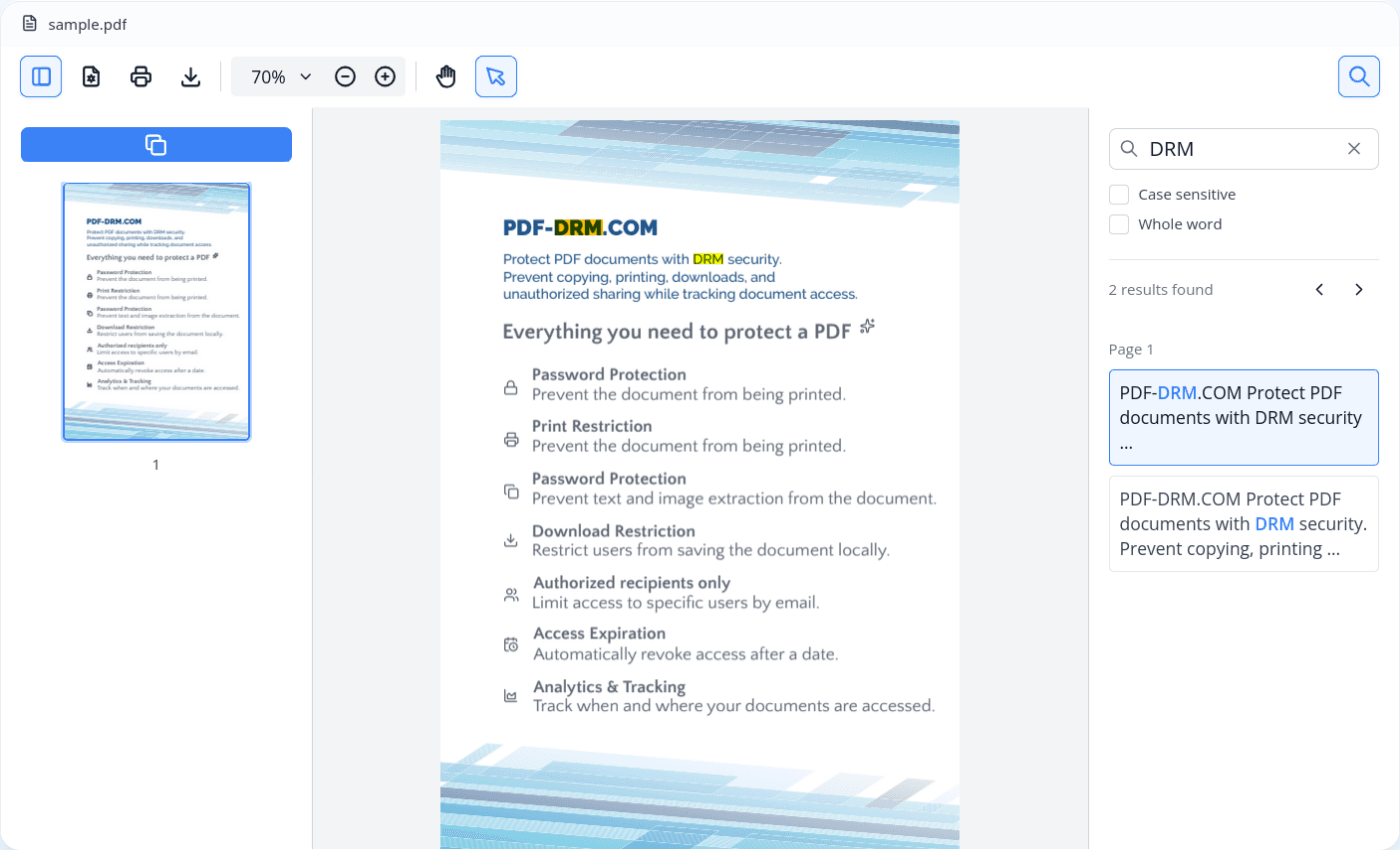
Benefits of browser-based PDF viewer
No Software Installation
Recipients can securely view documents using modern web browsers without installing desktop applications, browser plugins, or PDF reader extensions. This reduces IT support requirements and allows users to access documents quickly.
Works Across Multiple Platforms
Browser-based viewers are compatible with modern operating systems and devices, making document distribution easier for organizations with remote employees or external partners.
Continuous Access Control
Unlike traditional PDFs, permissions remain under the control of the document owner. Access can be updated, restricted, or revoked whenever necessary.
Improved User Experience
Recipients simply open a secure link and authenticate if required. There are no complicated installation steps or software compatibility issues.
Common use cases
Browser-based PDF DRM viewers are used by organizations that need to securely share and distribute confidential documents while maintaining control after they have been shared. It is commonly used to distribute:
- Sales proposals and quotations
- Contracts and agreements
- Product demonstrations and marketing materials
- Design documents, engineering drawings, and technical specifications
- Product documentation and user manuals
- Training materials and educational resources
Any organization that regularly distributes confidential PDF documents can benefit from maintaining control after sharing.
How does PDF-DRM.com PDF viewer work?
PDF-DRM.com PDF viewer keeps the original PDF securely on the server. Instead of downloading the complete document to the user's device, pages are securely rendered on demand and streamed to the browser only after the user has been authenticated.
The document access process consists of five steps:
- The user opens a secure sharing link in their web browser.
- The server authenticates the user (if required).
- After successful authentication, the server renders the requested page and applies DRM protections, including dynamic watermarks.
- The rendered page is streamed to the browser for viewing.
- Every protected action, such as copying, printing, or downloading, is authorized by the server before it is allowed.
When a user opens a secure sharing link, the browser-based PDF viewer requests the document from the DRM server. Before any content is displayed, the server checks whether the document requires authentication. Depending on the document's security settings, the user may be prompted to enter a password, verify their email address using a one-time code, or complete both authentication steps before access is granted.
Once the user has been authenticated, the server renders only the page currently being viewed—typically the first page. During rendering, the server applies all configured DRM protections, including server-generated dynamic watermarks containing information such as the recipient's email address or access timestamp. The rendered page is then streamed to the browser-based PDF viewer for display.
As the user navigates through the document, additional pages are rendered on demand by the server. Because the original PDF file is never transferred to the browser, organizations can significantly reduce the risk of unauthorized downloading while maintaining full control over document access.
Whenever the user attempts a protected action, such as copying, printing, or downloading, the browser-based PDF viewer sends the request to the server. The server verifies the document's DRM permissions and either approves or denies the requested action based on the security policies configured by the document owner.
Since every document request is authorized by the server, administrators can modify permissions, revoke access, or update security settings at any time without redistributing the document or changing the secure sharing link.
Key features
PDF-DRM.com browser-based PDF DRM viewer can enforce multiple security controls depending on organizational requirements.
Restrict Copying, Printing, and Downloading
It protects confidential documents by preventing unauthorized copying, printing, and downloading. Instead of distributing unrestricted PDF files, documents are viewed through a secure online viewer where DRM policies remain enforced. This helps organizations protect intellectual property, reduce unauthorized redistribution, and maintain control over sensitive information after it has been shared.
Restrict Access to Authorized Users
Access can be limited to specific email addresses or approved email domains, allowing organizations to securely share PDF documents with specific users instead of anyone who has the link. Only verified users can open protected documents.
Dynamic Watermarking
Dynamic watermarking overlays personalized information such as the recipient's name, email address, or the current date and time directly onto every page while the document is viewed. Each authorized recipient sees a unique watermark, helping discourage unauthorized sharing and making leaked copies easier to trace back to their source.
Document Expiration
Documents can automatically expire after a specified date or after a certain number of days, ensuring temporary access for projects, contracts, or time-sensitive information
Revoke Access Instantly
If a user's access should be removed, permissions can be enforced and applied immediately.
| Feature | Standard PDF Viewer | Browser-Based PDF DRM Viewer |
|---|---|---|
| User Authentication | Limited | Yes |
| Download, Copy & Print Restrictions | No | Yes |
| Dynamic Watermarking | No | Yes |
| Document Expiration | No | Yes |
| Access Revocation | No | Yes |
| Offline Access | Available after download | Requires internet connection |
| User experience | Depends on installed software | Browser-based, no installation required |
Limitations
While browser-based PDF DRM viewers offer significant security advantages, organizations should be aware of certain limitations:
- Users require an internet connection to access protected documents.
- No digital security solution can completely prevent screenshots.
- User experience depends on the network performance.
Conclusion
Browser-based PDF viewers with DRM protection enable organizations to securely distribute confidential PDF documents without requiring recipients to install software. By combining secure online viewing with DRM controls such as copy protection, printing restrictions, authorized recipients, dynamic watermarking, document expiration, and access revocation, businesses can maintain control over sensitive information after it has been shared.
FAQs
Is the PDF downloaded entirely to the recipient's browser cache?
No. The server renders only the currently active page layout and streams it to the viewer as an image with layout text. The source PDF binary never leaves the server.
Does the browser viewer work on mobile devices and tablets?
Yes. Because it is plugin-free and built using modern web standards (HTML5, JavaScript, and CSS), the viewer works across desktop, tablet, and mobile browsers, including Safari on iOS and Chrome on Android.
How can I prevent users from taking screenshots of my document?
While no software can physically prevent someone from taking a photo of their screen with another device, dynamic watermarking containing personalized watermarks such as the user's email address, and access timestamp provides a strong deterrent against unauthorized sharing.
Secure Your PDF Documents Today
Your documents contain valuable information - don't leave them unprotected. PDF-DRM.com gives you the tools to secure PDF files, control access, prevent unauthorized usage, and confidently distribute sensitive content online. From password protection and copy restriction to access expiration and advanced analytics. Start protecting your PDF documents today.